Intelligent E-Shop Search: The Key to Higher Conversions - NEW
Optimized search on an e-shop can significantly simplify the customer journey to a product – and increase your conversions. Yet, 41% of e-shops struggle with unintuitive search, unnecessarily slowing down the buying process. Many stores underestimate its importance and lose customers before they even find the product. Let’s explore how to optimize e-shop search so that it is fast, accurate, and truly effective.
Why E-Shop Search Often Fails
Many e-shops invest in design and expanding their product range, but often underestimate the quality of the search function itself. The result? A customer enters an exact product name or code, such as “Ne59T4311Ss”, and the system fails to return relevant results – even though the product is actually available.
This failure can stem from incorrect indexing of product page content, poor handling of synonyms, typos, or missing search logic configuration. In practice, this means customer frustration and lost orders before the purchase process even begins.

OpiTip: E-shop search goes hand in hand with SEO. By performing a thorough keyword analysis, you can discover which terms potential customers use when searching for products. Tools like Semrush or Ahrefs can be very helpful. The keywords you identify should then be implemented in product titles and descriptions, ensuring that customers are presented with relevant results when they search.
Monitor User Behavior
By analyzing customer interactions, you can identify where they encounter obstacles – for example, repeatedly returning to the search bar or entering similar phrases multiple times. Focus on:
- Which customer phrases return no results?
- Which phrases have high click-through rates?
- What proportion of users convert after using search?
- These insights can reveal gaps in search logic or missing products.
OpiTip: To improve the search experience, implement a system with advanced algorithms that handle synonyms, abbreviations, and typos, complemented by features like autocomplete while typing and personalization based on user history. This ensures faster, more accurate searches and leads to satisfied customers.

The Importance of Focusing on Search Optimization
High-quality search directly impacts customer satisfaction and conversion rates. If a customer cannot find what they are looking for, they are likely to leave your site and turn to a competitor. Therefore, investing in search optimization is essential to increase customer satisfaction and maximize sales.
To evaluate the effectiveness of e-shop search, it’s crucial to track these metrics:
Conversion Rate (CR)
This metric reflects the success of the search system in turning interest into sales. Improving the conversion rate is directly linked to increasing revenue.
Click-Through Rate (CTR)
CTR helps identify gaps in the relevance of search results. A low CTR may indicate that results don’t meet customer expectations, while also providing insights into customer interest in specific products.
OpiTip: By integrating artificial intelligence into your website’s search, you can deliver faster, more accurate, and personalized results. AI also continuously analyzes all search queries, allowing the system to improve over time and better meet customer expectations.
How to Optimize E-Shop Search from a UX Perspective
1. Accurate Search
Accurate search ensures that when a customer enters a specific product name, model, or product number (e.g., "iPhone 13 Pro Max" or "SKU12345"), relevant results are returned.
Recommendations:
- Index all relevant fields: Make sure the search system indexes product names, descriptions, product numbers, and other relevant attributes.
- Support synonyms and abbreviations: Ensure the search recognizes synonyms and common abbreviations, e.g., when a customer types "TV", the system understands it refers to "television".
- Autocomplete: Provide an autocomplete feature that suggests possible results as the user types their query.
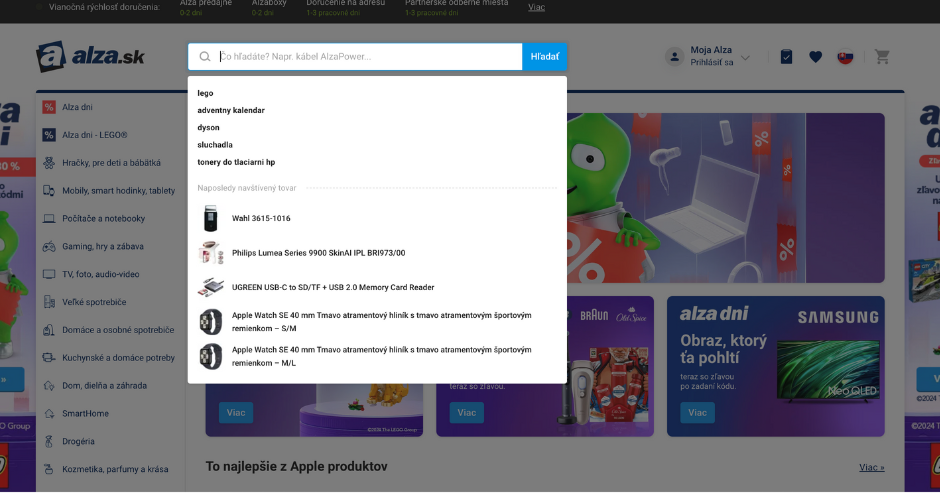
OpiTip: A useful implementation detail is to keep the searched term in the search field after performing a search. If the first query doesn’t return the expected results, the customer can easily modify, refine, or adjust their query—adding or removing words—without having to retype the entire search. This is especially important on mobile devices, where retyping can be cumbersome.
2. Search by Product Type
Customers often search for products by category or type, such as “women’s jeans” or “laptops”.
Recommendations:
- Category hierarchy: Create a clear and logical category structure that allows customers to easily find the desired products.
- Filtering and sorting: Enable users to filter results by various attributes (e.g., price, brand, size) and sort according to their preferences.
- Display related categories: If a customer searches for “women’s shoes”, also show subcategories like “sandals”, “boots”, etc.
- Automatic redirection to category page: If the query closely matches a category name (e.g., “women’s jeans”), automatically redirect the customer to the relevant category page for faster product discovery.
3. Search by Product Attributes
Queries focused on specific product attributes, such as “black leather jacket” or “double bed”, require precise handling.
Recommendations:
- Detailed product specification: Ensure every product has comprehensive attributes filled in, such as color, material, resolution, etc.
- Recognition of multiple attributes: The search should be able to combine multiple entered attributes and display products that match all criteria.
- Flexible filtering: Allow customers to easily adjust filters and refine results according to their preferences.
- Display products by specific attributes: If a customer searches based on an attribute, like color (“red bed”), the results should show only red variants, not all available colors.
4. Search for Specific Purposes
Sometimes customers search for products with a specific purpose in mind, such as “wedding gift” or “running outfit”.
Recommendations:
- Create themed collections: Develop special collections or product categories designed for specific purposes or occasions.
- Content optimization: Use purpose-related keywords in product and category descriptions so that search can easily identify relevant items.
- Personalized recommendations: Based on customer behavior, suggest products that match their needs for a particular occasion.
5. Search by Brand
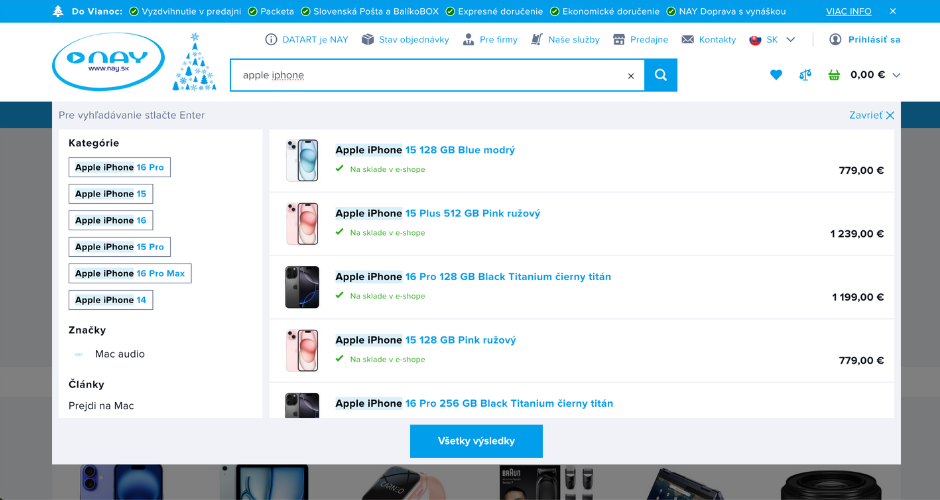
Many customers prefer specific brands and search for products accordingly, such as “Nike sneakers” or “Apple iPhone”.
Recommendations:
- Highlight brands: Ensure the brand name is clearly included in the product title and description.
- Brand filtering: Allow customers to filter products by brand and display the brand logo for easier navigation.
- Show related products: If a customer searches for a specific brand, also suggest other products from the same brand.
6. Tolerance for Typos and Errors
Customers may make typos or grammatical mistakes when entering queries. The search system should be intelligent enough to recognize these errors and still provide relevant results.
Recommendations:
- Implement fuzzy search: Use algorithms that can identify and correct common typos or mistakes in queries.
- Suggest correct terms: If the system detects an error, it should offer a suggestion for the correct term (e.g., “Did you mean ‘television’?”).
- Automatic correction: For common typos, implement automatic correction that adjusts the query without user intervention.
7. Search for Multiple Language Versions
If your e-shop operates in multiple markets or serves a diverse customer base, it’s important to support search in different languages.
Recommendations:
Content localization: Translate product names, descriptions, and other relevant information into the languages your customers use.
Query language detection: The search system should be able to identify the language of the entered query and adjust results accordingly.
Multilingual synonyms: Include synonyms and equivalent terms in different languages within the search system to improve result accuracy.
8. Personalized Search
Personalizing search based on a customer’s previous behavior can significantly improve the relevance of results and increase conversion rates.
Recommendations:
- Analyze browsing history: Track which products the customer has viewed or purchased and tailor search results accordingly.
- Custom recommendations: Suggest products that align with the customer’s preferences or are related to previous purchases.
- Save preferences: Allow customers to save their preferences (e.g., favorite brands, sizes) and take these into account during search.
9. Don’t Forget Mobile Optimization
Optimize search for mobile devices by including large buttons, automatic keyboard expansion, and intuitive suggestions. Ensure the search field is easily accessible without scrolling.
Recommendations:
- Prominent placement of the search field: Make sure the search bar is clearly visible and accessible without scrolling. It should be one of the first elements on the screen.
- Large buttons: Use large buttons for filters, categories, and search actions to make interaction easier and prevent accidental clicks.
OpiTip: In addition to products, your search system should also support non-product content, such as contact information, terms and conditions, returns, and other important links typically found in the website footer. Making these pages easily searchable improves access to essential information and enhances the overall user experience.
Risks Associated with Poor Search Functionality
A malfunctioning or inaccurate search system can have serious consequences for e-commerce businesses:
- Loss of Sales: If customers can’t find the products they’re looking for—even though they’re available—they’ll likely leave for a competitor.
- Reduced Customer Trust: Repeated issues with search can frustrate users and erode their confidence in your store.
- Negative Reviews: Unsatisfied customers are more likely to leave poor ratings, which can damage your brand’s reputation.
- Increased Support Costs: When customers struggle to find what they need, they often turn to customer service, increasing operational costs.
Investing in a high-quality search solution is an investment in customer satisfaction and long-term business success.
Our team has successfully redesigned multiple e-commerce interfaces with optimized search experiences.
If you’re ready to take your online store to the next level, get in touch with us — we’ll help you design a smarter, conversion-driven website that truly sells.