7 tips that improve the CTR of your newsletters
Emailing is an effective tool whose power is still often underestimated. It is the most personal marketing channel; it is also a topic that we often focus on in our OpiStarter workshops. Below, we’ll present you with few situations based on practical examples that we most often encounter. Think about whether you, too, make these mistakes in your newsletters.
A person receives an average of 121 emails a day. How in the world can they distinguish yours from that amount? Before you write your newsletter, think not only about its content, but also about its form.
Even though this involves the details, they play an important role in whether the reader will react in the desired way or the email will end up in the spam folder.
OpiTip: Your main goal with each newsletter is not just to inform the customer about the ongoing campaign. You also want to sell with emails.
What is a newsletter and what is emailing?
They are both very effective online marketing tools, the aim of which is to deliver relevant or promotional information via email to the recipient who has agreed to receive it in advance or who has requested it himself.
Even though these terms are often used synonymously, there is a difference between them. While the content of a newsletter is more informational and arrives at regular intervals, emailing mainly means a promotional email sent in connection with an ongoing campaign or event.
How to create a sales newsletter?
With a newsletter, you want to attract customers, get into conversions and eliminate the number of unsubscribes.
But let’s get straight to the point and talk about which areas are often ineffective in emails.
A concise and engaging subject line is the alpha and omega
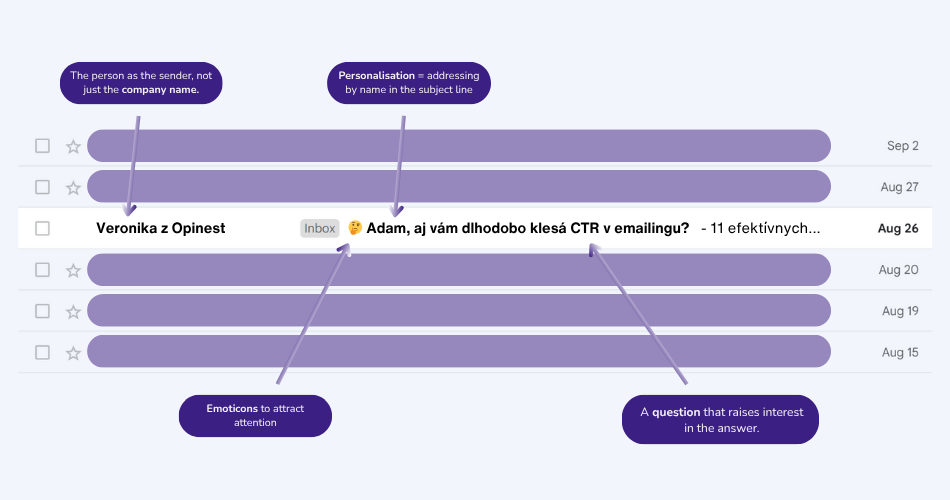
The subject line of the email is key. If it appeals to the reader, there is a 47% chance that they will open your email. Paradoxically, there are companies that put the word “Newsletter” in the subject line. This reduces the chance of it being opened by approximately 19%.
The optimal length of the subject line is around 41 characters, but avoid spammy words like “awesome”, “brand new”, “certified” and similar “tricky” expressions.
If in the subject line of your email you ask a question that will pique the reader’s interest in finding out the answer, the chance of opening the email will increase by another 10%.
We recommend that you personalise the subject line of your email. Address customers by name. They will appreciate it.
What if you annoy people over time?
“Customers call me and say they’re getting emails, and they can’t cancel them.”
“I understand. And do they have an unsubscribe option in their emails?”
“Well, I need to find out.”
The problem our partners are facing is that they are getting questions on the customer service line about how to unsubscribe from emailing. This annoys people on the customer service line because they have other things to worry about than solving such concerns, which should be primarily taken care of by the marketing department.
In such cases, there are 2 variants:
- either the “Unsubscribe” option is so small and almost invisible that the link is easily overlooked,
- or the “Unsubscribe” option is not included in the email at all.
Ideally, put the unsubscribe link at the end of your emails – prominently, don’t hide it. Offer your customers the option to unsubscribe.
Use personalised elements
Aside from addressing them by name, an effective way to address customers is to tailor your content to specific customer groups based on their behaviour patterns. It’s easier to engage them when you understand what they want to see.
Thanks to personalization, you can increase your email open rate to up to 82%.
- A short, concise subject line to the email will grab their attention. Appeal to their needs; target their interests.
- Addressing customers by name in emails.
- Sending emails when they have a name day or birthday: if you have collected other information from your customers, such as their birthdays, names, or even preferred features of the products you offer (favourite sizes of T-shirts, pants, shoes, favourite types of flowers, favourite brand of cosmetics, etc.), you can easily personalise your emails.
- Related products: related products will change in emails depending on which products the customer saw last in the eshop/which of them he/she bought in a previous order.
- Segmenting customers by preferences: if you offer a wide range of products (from gardening supplies to car accessories to cosmetics), don’t forget to divide customers into relevant groups.
- Information about an abandoned shopping cart: Up to 74% of shopping carts are abandoned. To prevent this from happening, contact potential customers with automated mailings.
Play with design and stylistic consistency
The design of an email has a big impact on whether a person even reads an email or throws it in the trash. Focus on the following:
- Following the rules from the brand manual: Like any other channel used by a business, a newsletter is part of the communication of a given brand. The font, colours, tone of voice, banners and other signs that present your brand should be in line with your brand manual.
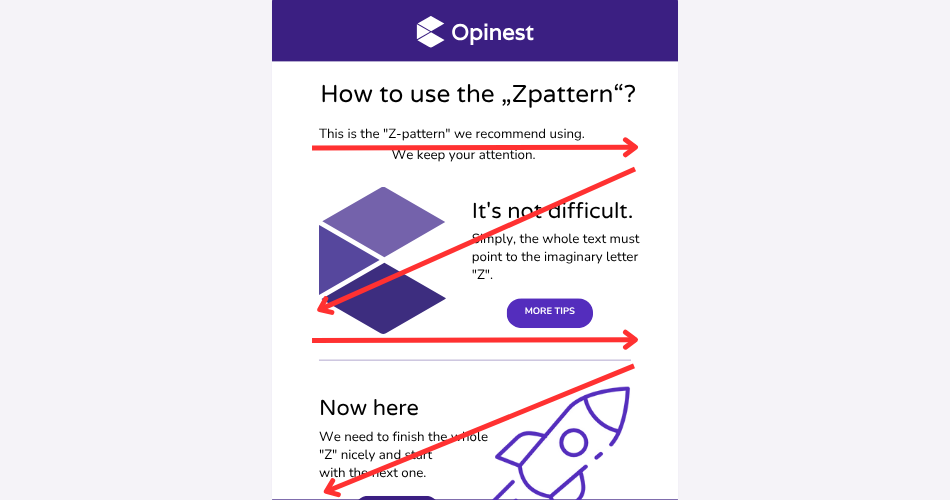
- PNatural “Z-pattern”: The specific layout of text and other elements in an email uses the natural way you move your eyes when reading the text and “forces” the reader to read it in its entirety. The same applies to a product page.
- CTA button: One well-chosen button, a maximum of two, suffices to increase the click-through rate; don’t overdo it. You’ll unnecessarily distract the reader by giving them too many options to choose from.
- Language in your email: If you want to use a joke, consider well who your audience is and whether they’ll appreciate it. The same is true for using emojis or symbols – unless they completely fit into your brand’s communication, it’s better to avoid them.
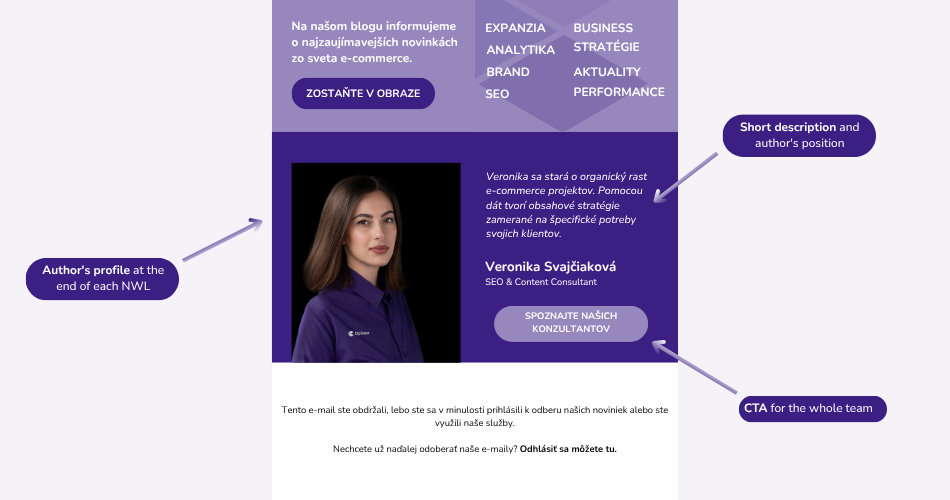
- Give your company a face: Add the name or photo of a member of your team who is a “guarantor” of credibility on a given topic to your newsletter.
If your emails are consistent and written in a similar style, they’ll become your hallmark that will differentiate you from your competitors.
Don’t forget the visual elements
Images are eye-catching – but they are not enough by themselves. Don’t forget that many people have images in emails blocked by default. Therefore, always write important information as text. The ideal ratio? Text wins – at least 60%.
Optimise for mobile phones
Despite the fact that mobile viewing is dominant across all channels, we often forget about it when preparing newsletters.
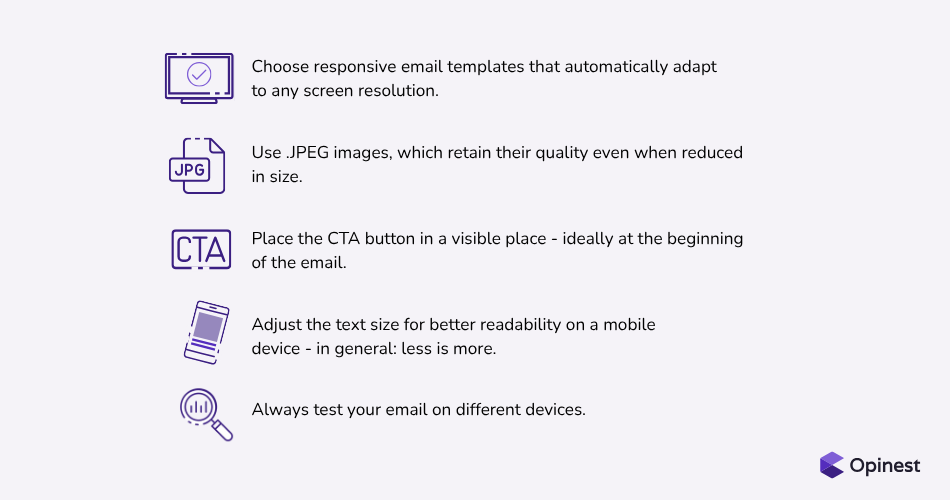
Most people read emails on their mobile. If they cannot read the newsletter comfortably, they will simply close it. Use responsive templates, shorten texts and put the CTA button right at the top where no one will miss it.
Add a call to action (CTA button)
A good CTA is not only colourful, but also clear. Tell the reader exactly what he or she will get. Don't overdo the length and leave enough space around it – even blank space helps the button stand out.
Content that has something to say
Don't let the newsletter be just about sales. Add tips, inspiration, interesting news. People want to read what interests them – and if you offer it to them regularly, they’ll look forward to your email.
OpiTip: Read every newsletter through the eyes of your ideal readers before sending it. Do people have a reason to click on it? Will they gain something by doing so? And can they read it on public transport via mobile? If yes, then you're on the right track.
Don't know where to start? Or do you feel like your emailing needs a breath of fresh air? Get in touch with us – we’ll be happy to help you with that.